Amazon Smart Ad

Showing posts with label Verizon. Show all posts

Monday, September 2, 2013

How to Keep Your Unlimited Data on Verizon


So it is no big surprise that the most valuable cell phone data plan that you can have now is an old grandfathered unlimited data plan. With "Share Everything" Plans, Verizon wants you to think that a tiny bucket of data shared amongst a couple of lines is a really great plan. On the onset you might even appear to save some money. However, as more people get onto LTE phones like the Apple iPhone 5 or the Galaxy S 4 and off of the Verizon's antiquated and slow 3G network, people are going to realize something that I've known for a long time already; having super fast internet on your phone is really awesome. The problem is, I don't know anyone that saved money on the new plans AND didn't have to change their browsing habits. Shutting your phone off when you get close to your data limits, or hunting down free WiFi isn't exactly something that the sales rep at Verizon tells you when you first sign up for the new plans. There is a way to save your Verizon unlimited data though and it isn't that hard.

Saving your Verizon Unlimited Data involves a couple of things. Either you pay the full price of a new phone, buy one used, or use my trick. Those are  your only three options.

Buying a new phone off contract means you go to Verizon and pay the $650 or MORE for a new phone. Nothing affects your contract since you are not having Verizon paying the majority of your phone off for you. The same applies if you go and buy an used phone off of eBay or swappa.com. As long as Verizon isn't paying off part of your phone your contract isn't affected at all, and you keep your unlimited data.

You can get a new phone on Verizon, pay the cheaper on contract price and keep your unlimited data, and here's how.


Tuesday, February 26, 2013

This is going to get me in trouble


I started a couple of years ago with an iPod Touch, but sold it to pay the power bill. 

Then I got an iMac.
Then the 3rd gen iMac.
Now I've had the iPhone 5 for three days. 

There's been a billion articles written about the iOS vs Android back and forth, this vs that -- blah blah blah. For me the ONLY reason to switch was to see if the iPhone picked up better than the S3. The S3 has been a PITA since I got it the Jelly Bean update, dropping LTE and 3G, shaky connections and worst of all, the mobile hotspot didn't work worth a flip. I reset the phone almost weekly, tried flashing different radios on it, flashed a couple of ROMs on it to try and see if there was some magic combination of ROM and radios that would work for me. Nothing worked. Verizon did everything they could, even upgraded the equipment at the tower I use at home (it was scheduled to be upgraded anyway, they just did it faster.) Nothing worked, I was sent 3 different S3s, and even got an Ausrion replacement S3 that was refurbished in the USA. Nothing worked. 

My wife's Razr Maxx had this really bad thing where it wouldn't hold LTE even though the S3 was chugging along with a 4-5 bars of LTE. It would drop to 3G and sometimes 1X, flipping around like crazy, but the hotspot worked since she was on ICS and not Jelly Bean. This problem is well documented on the Razr line and maybe the Jelly Bean update would fix that. 

I'm sick of the bullshit. I've tried and tried to make this work, but I need my phone to have LTE, and have a good enough hotspot connection that I can get my schoolwork and such done. 

Anyway, you know how this story is going to turn out. I got the iPhone 5. I don't have any problems with reception. My hotspot works great and it even seems to work better than on Android since my iMac does USB tethering natively and the iPad works great off the iPhone hotspot too. 

My phone needed to have a strong connection, and I suspect that there is something going on with Android and CDMA that isn't playing nice when in a somewhat fringe area of coverage. For whatever reason, the iPhone just works for where I live and I have to live with that.

I'm not an Android fanboy, and I'm not an Apple apologist. Apple has conducted a hack and slash campaign of litigation that I personally find disgusting. I still have the Razr Maxx and I hope to get it updated to JB through WiFi. Hopefully I will get into the soak test. I still have my Nexus 7 and quite possibly will have this tablet until it just won't run anything anymore, I love my N7.

If I need to spell this out for you, I will. Android has a serious problem when it comes to carriers and OEMs mucking up the code. Android comes out clean, fast and for the most part problem-free. Some will argue that 4.2.1 was a clusterfuck, and it was but 4.2.2 has fixed most of what I had issues with. My Nexus 7 is pure Android. It works wonderful, I love the thing. I imagine that the Nexus 4 is a lot like the  Nexus 7, but I am tied to Verizon and I can't up and leave the only carrier that has LTE where I live. My last experience with a Nexus phone was the Verizon Galaxy Nexus. What a clusterfuck that was, thanks Verizon. 

So the only way to get a pure OEM experience, which is very important to me is to get a newer Android phone, and root and unlock the bootloader, and install an ASOP ROM, which voids your warranty. Or go to the one company that sticks a middle finger up at Big Red and get an iPhone. 

So what does this mean? Do I lose my Android Cred since I have an iPhone? Maybe. Maybe I love technology and need to know that my phone is going to work, and be updated in a timely manner. That's why I got a Nexus 7, updates right from the el Google. To be clear what drive a wedge between me and Android is Verizon. Carriers suck and they need to stop putting custom skins on stuff, this goes to OEMs and fuckWiz and Sense and all the other LG cartoon skins. It needs to stop. 

Sunday, July 22, 2012

HughesNet Sucks There Are Other Options Out There


After two years of using HughesNet, and an initial honeymoon period where I was pretty happy with the service, I have come to lathe HughesNet and with all every fiber of my being. HughesNet sucks. It just really sucks, and it only seems to be getting worse. You can barely play World of Warcraft, can't play anything on Xbox Live, and quite a few times you can barely get your Gmail to load up. 

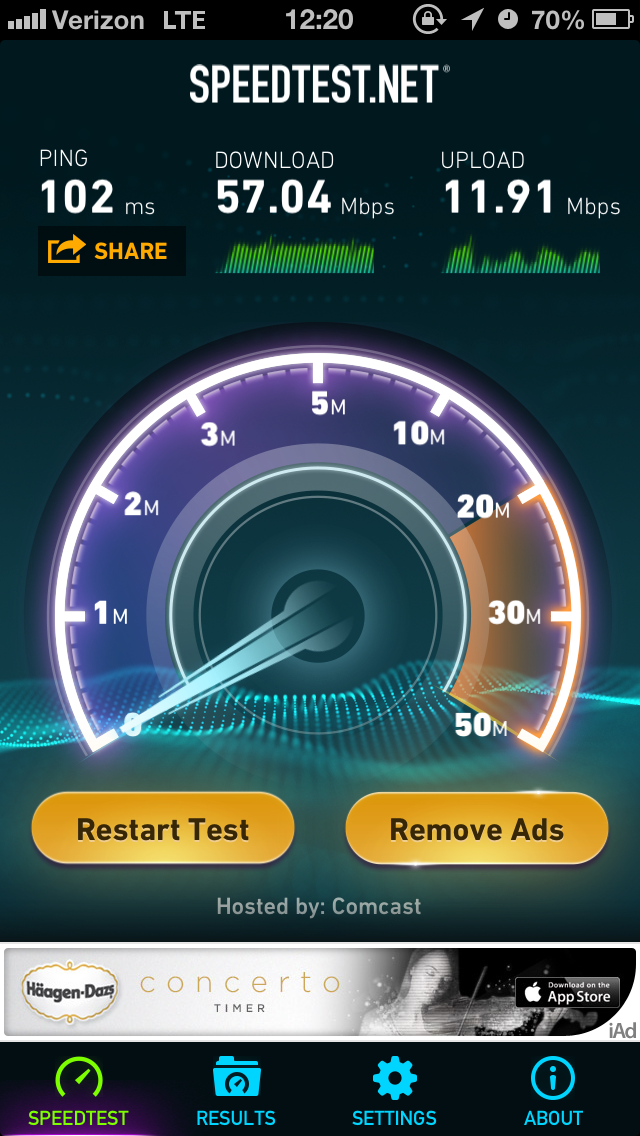
I know that there isn't much that's objective here, so I will just go ahead and post one photo.
Top is Verizon LTE tethered from a Galaxy Nexus
Bottom is HughesNet on a typical Sunday night.

The speeds that you are seeing on HughesNet above (bottom photo) are typical when you are in an area where there are quite a few other homes with HughesNet service. It's not unusual for HughesNet to totally oversell your area and when you all try to use the service at the same time, you can't get online at all. 

I know that two years ago I didn't have any options. Verizon only had 1X (2G) service. Then Verizon had 3G, and Verizon 3G is good enough for web surfing, playing World of Warcraft, and online games. 

Verizon LTE is a whole new ballgame. Speeds from 17 MB down and 7 or 8 up are typical. I am far away from the tower, but I have a Wilson Electronics LTE booster that's boosting my LTE and 3G signal enough to make me feel like I am actually using proper broadband.  (I am in the middle of writing up a huge post on Wilson Electronics, they fricken rock.)

Before you sign anything with HughesNet, please check all your options. Check wireless carriers. Do your research on the Internet. Anything is better than HughesNet. 

Monday, March 19, 2012

Verizon, Motorola Deploy Diagnostic Software


There was quite an uprising over the while Carrier IQ deal, and carriers quickly learned that people don't like the idea of their every keystroke and swipe on their devices was being recorded. While that may not be the absolute truth as to what was really going on, that's pretty much how the community perceived Carrier IQ and it went quickly into damage control mode and hired a PR firm to educate and inform the public as to what it actually does. 

Now it seems like there is a slow move to push software on your phone that will allow remote access to your phone. Both Verizon and Motorola have programs in place to allow a customer service agent to quickly get into your phone and fix any problems remotely. 

Friday, March 2, 2012

Where Did the $90 Nexus Pogo Dock Go?


Earlier in the week, I posted that the Galaxy Nexus finally had a pogo dock available, and outlined the $90 price and the fact that the dock was backordered. The guys over at Android Central did a hands on and there is still some debate as to if the price is too high, but there is no denying the demand is there.

There were problems with the placement of the power button. Basically when you place the phone in your new shiny dock, you can't get to the power button, so you can't turn off the screen. Is this the reason that the dock is not available anymore from the Samsung website? Or is the dock heading to Verizon now and Big Red asked Samsung not to sell the dock through their own website?

Considering that all the other accessories are sold by Verizon and Samsung, that wouldn't really seem to be case here, but there is something up.

If Samsung responds to my email, I will update this post with more information.

*Looks like the dock is pulled until the 4.0.4 update is official for the GNex. The update fixes the issues that most people are having with the dock. Sounds like this is a little bit of miscommunication between Google and Samsung. 

Source: Samsung


Saturday, February 25, 2012

POGO Dock Finally Available for Galaxy Nexus


If you are wondering what POGO pins are and what the heck they do in a dock, you are not alone. The Galaxy Nexus has three little metal pins on the right hand side of the device, and these pins are used to charge the phone. Get a dock with POGO pins and you only have to set the phone down into the dock and it will start charging. Pretty nifty eh? No more fumbling around for a plug and it will save wear and tear on the usb charging port.

Friday, February 24, 2012

Why the (#*$&!!* is Verizon's Network Not Working?


It used to be pretty simple to be a Verizon customer. You buy a phone, and you knew that while you might be paying a more than the average customer, you knew that not only was your network everywhere, it worked all the time. There was a time when Verizon customers would make fun of AT&T or Sprint customers when their phones lost data, or text didn't work. You really do get what you pay for, especially at a sporting event or other large gathering of people in a small area. Verizon always seemed to work better than the competition.

As more people are buying LTE devices on Big Red, there are more and more people grumbling about Verizon's phones not working as intended. Dropped data is a big one, or getting stuck on 1X. It isn't any fun when you expect 4G and get 1X. So what's going on? Let's take a look at what's going on with Verizon today.

There aren't any engineering degrees hanging on my walls, I am a chef by trade. However, explaining what's going on with Verizon right now isn't rocket science. It is just a matter of math.

Currently, Verizon is supporting quite a few different kinds of networks. Most of the USA is covered in 3G, and that's what most people are thinking of when they buy or use a phone. 3G works great, it transfers data to your phone relatively fast, and the phone and tower talk to each other with a minimal delay. That's to say that the 'ping' or 'lag' is low. What that means is stuff starts happening almost right away when you press a button in your phone's browser.

In areas that are far away from towns, or fringe coverage areas, your phone might pick up 1X. That's an old network. It is 1G so to speak, compared to 3G and 4G. (2G wasn't really adapted.) It works fine for calling and texting, but you might notice that data doesn't work all that great on 1X. Not only does the data crawl along at a snail's pace, slower than dial-up speeds, it also has a very high amount of lag. It might take 2 seconds for data to travel back and forth from the tower, so browsing websites and apps might act like they are not connected at all when you start using them.

The technology used above is CDMA. You don't need to know what that means, except that CDMA phones don't need SIM cards. But wait, 4G LTE uses a SIM card so what's up with that? LTE technology is based on GSM, like your friends on AT&T there is a SIM card involved, and all Verizon 4G phones have a SIM card tucked under the battery cover.

Here's where the issue comes in. CDMA doesn't talk to GSM. It just doesn't work. So Verizon had to make another network to manage the handoff between 4G and 3G. That network is eHRPD. If you have a Verizon LTE phone that's on 3G, it's hanging out on the eHRPD network. You can check this yourself by going into your phone settings--> About phone--> Status and it's listed under Network.

This go between network is what's causing most the issues with Verizon's network lately. It is also why when the LTE network goes down, 3G tends to go down for 4G phones, despite what Verizon's PR teams might say. It is also why the transition from 4G to 3G can be painfully long, as the phone tries to handshake back and forth from 3G to 4G.

Well if eHRPD is the problem, can I just disable it? Well there is a way to do it on most phones, but it doesn't always stick if you reboot the phone, not to mention it involves digging into test menus that Verizon really doesn't intend the general public to get into.

So where does that leave us now? Well Verizon is in a transition phase right now. The idea is to get the whole country in LTE coverage by the end of 2013, that means phasing out 3G and also 1X. Once Verizon has us all on LTE phones, then you will see phones that don't have 3 different radios in them-and hopefully battery life will be much improved by then. Verizon is going to have your voice data over LTE soon, the concept is just now breaking. This isn't ideal for us now, and believe me, if you buy a LTE device now or in the next year, you are an early adaptor of this new technology. Things are going to be so much better when these legacy networks go away.  

Sunday, June 13, 2010

Why Verizon Customers Might Want to Not get that Incredible **update

If any of you know me personally, you know that I am never really more than a couple of inches from my phone. If my penis was to become detachable and polymorph in to any shape that I wanted it to, it would be a Blackberry. Honestly, I kinda think that I may have my hands on my phone more than my penis only because it is more socially acceptable to have my hands on my phone than it is on my penis.

Anyway that tyrant was all leading up to my excitement over these phones coming out. First up, my current love: